Efficient User Account Management for WordPress

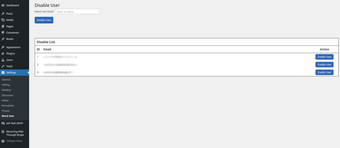
Disable User Login is a WordPress plug-in designed to enhance security and access control by allowing administrators to disable user accounts with ease. After installation and activation, the plug-in presents a list of existing user accounts, enabling admins to enter an email address of the user they wish to restrict from logging in. This feature is particularly useful for managing user access during development or addressing issues such as unpaid invoices.

When a disabled user attempts to log in, they are immediately logged out and redirected to the login page with a notification stating that their account has been disabled. This streamlined approach to user management helps maintain control over who can access the site, making it an essential tool for any WordPress administrator focused on security and privacy.
 0/1

App specs

Program available in other languages


User reviews about Disable User Login

Have you tried Disable User Login? Be the first to leave your opinion!

Add review

You may also like

Explore Apps

Latest articles

Laws concerning the use of this software vary from country to country. We do not encourage or condone the use of this program if it is in violation of these laws.
Softonic

Is Disable User Login safe?

100/100

Score result: Clean

This file passed a comprehensive security scan using VirusTotal technology. It is safe to download.

  • Virus free
  • Spyware free
  • Malware free
  • Verified by Security Partners

    VirusTotal logo

Scan Info

Last scan
Wednesday, February 19, 2025
Scan provider
VirusTotal · Full report

File Integrity

File
wp-users-disable.1.0.2.zip
SHA256
5468761a9b66f0e82078f51c7c25467e834cc18069814919cde3f4c8f4e839a3
SHA1
a7f54a56ea5f47dd9e5de5d1e4cad7be08b631c3

Softonic security commitment

Disable User Login has been thoroughly scanned by our advanced security systems and verified by industry-leading partners. This file comes from the official developer and has passed all our security checks, showing no signs of viruses, malware, or spyware. For more information, visit our Security and Trust Center